Use Cases

.avif)
You might have practiced against generic training bots that feel like a script on legs. They don't get frustrated, they don't calm down when you acknowledge them, and they certainly don't teach you how to "read the room."
This is the exact problem Convai's State of Mind is built to solve. It’s a real-time emotion layer for Convai characters that listens to context (persona, conversation, objectives) and updates the character’s feelings turn-by-turn.
This emotional state then influences their tone, wording, and delivery (i.e., AI voice, lip-sync, and facial expression). Use it to design realistic soft-skills scenarios, de-escalation practice, customer service training, coaching dialogues, and more.
According to Gartner, 85% of customer interactions will be handled without human agents by 2027, highlighting the need for emotionally intelligent AI in training simulations.
You don't just see the change on the visual emotion wheel in the Playground; you feel it.
When a user's angry turn makes the "Frustrated" slice spike, it's not just a color change. That shift instantly transforms the character’s delivery. You'll hear their voice get more clipped, their pace quicken, and their friendly tone disappear. Their language will adapt, becoming more direct or urgent. This is how you build practice that feels real, not robotic.
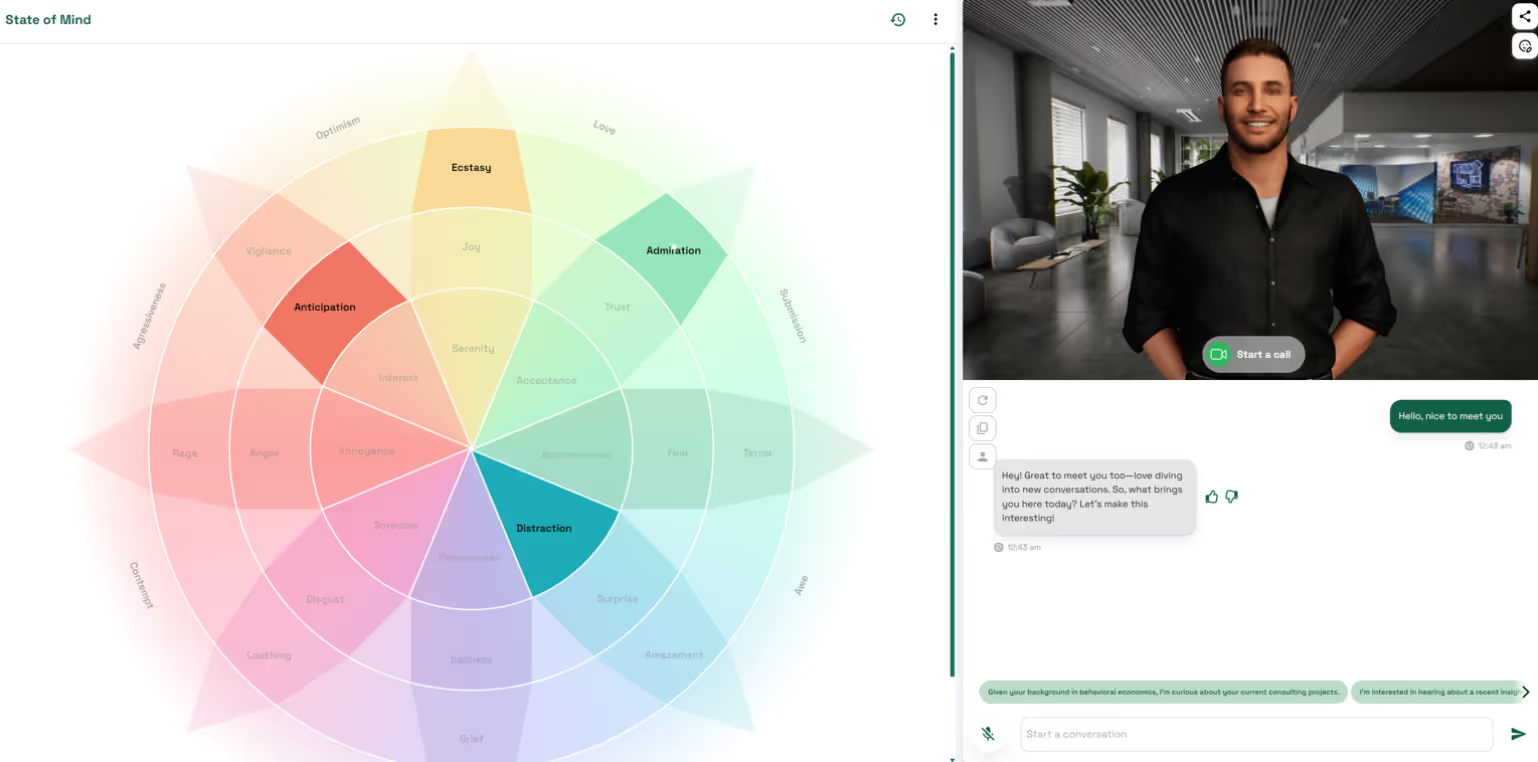
Playground → Character Customization → State of Mind
Tip: Keep persona instructions tight (“how they tend to behave”) and put domain facts in the Knowledge Bank. You’ll get cleaner emotional signals and more predictable behavior.
User: “Don’t tell me there’s nothing you can do. I paid good money for this ticket. Get me on another flight.”
State of Mind: Frustrated/Angry spikes (colored); Calm mutes.
Character (agent): “I’m really sorry this derailed your plans. Let me check options that still get you to Chicago tonight…”
State of Mind (next turn): Frustrated eases; Hopeful/Neutral rise.
Result: The conversation naturally de-escalates as the agent offers specific, time‑bound options.
Getting predictable, powerful emotional reactions is all about how you layer your instructions. Don't just rely on one field. Instead, pay more attention for all of the following:
What is Convai's State of Mind and how does it enhance character behavior?
Convai's State of Mind is an emotion layer that updates AI characters’ feelings turn-by-turn based on persona, objectives, and conversation context. This drives more natural and realistic reactions in tone, language, and non-verbal cues, improving engagement in training and simulation scenarios.
Yes, State of Mind integrates seamlessly with AI voice and lip-sync features to adjust speech pace, tone, and warmth as emotions shift, creating immersive, believable character interactions.
How do I customize emotional responses in Convai characters?
You control emotions by setting personality traits, speaking styles, narrative objectives, and attaching domain-specific knowledge in the Knowledge Bank. These inputs guide the emotional state reflected in the wheel and character behavior.
Is State of Mind compatible with 3D and XR environments?
Absolutely. Emotions update in real time during conversations and can trigger corresponding facial expressions, gestures, or body animations, making it ideal for XR and 3D simulations.
How can I verify what information influenced the character’s emotional state?
Convai’s Mindview feature lets you inspect the exact prompt components—persona, style, objectives, and knowledge—used by the model at each turn, ensuring transparency and control over emotional responses.
Does State of Mind work with voice?
Yes. Pair it with AI voice + lip‑sync to hear changes in tone, pace, and warmth as emotions shift.
Can I control which emotions appear?
You guide emotions through personality traits, speaking style, objectives, and conversation context. The wheel reflects the current result of those inputs.
How do I verify what the model actually saw?
Open Mindview to inspect the constructed prompt (persona, style, objectives, attached knowledge) for the exact turn you’re reviewing.
Does this work in 3D/XR scenes?
Yes. Emotions still update turn‑by‑turn; you can also trigger face/body animations or actions to match the state for immersive practice.


